

Sunsama Review 2026: The Daily Planning Tool for Deep, Focused Work
We used Sunsama as our daily planning hub for a month to see whether its calmer, ritual-based approach to planning still holds up against fully automated competitors.
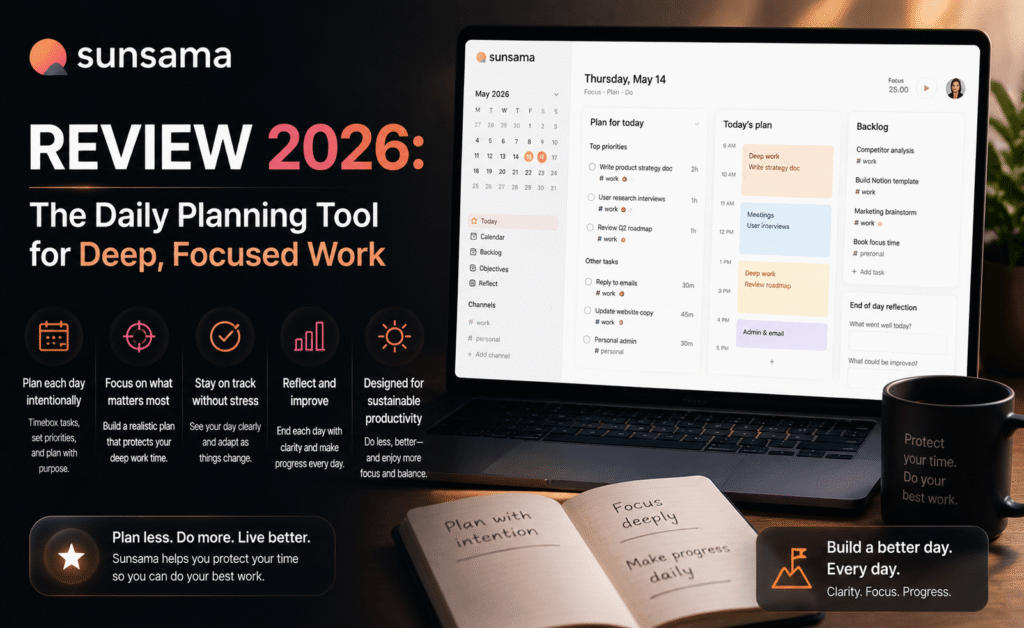
Sunsama Review 2026: The Daily Planning Tool for Deep, Focused Work
Sunsama Review 2026: The Daily Planning Tool for Deep, Focused Work
Rating: ★★★★☆ 4.0/5 — Best for: individuals who want a calm, ritual-driven approach to daily planning rather than pure automation.
Sunsama occupies a different corner of the productivity landscape than the auto-schedulers and workspace giants covered elsewhere in this series. Rather than trying to automate your day away, Sunsama is built around a deliberate daily planning ritual, pulling tasks from every tool you already use — email, Trello, Asana, Jira, ClickUp, Notion — into a single unified list you consciously plan each morning. We used Sunsama as our daily planning hub for a month to evaluate whether its slower, more intentional philosophy still holds up in an era of increasingly automated tools.
The Daily Planning Ritual
Every morning, Sunsama presents you with a fresh, mostly empty day and a backlog of tasks pulled from your connected tools. You manually choose what belongs in today, drag it onto your calendar, and give the day a shape before you start working. This stands in direct contrast to Motion’s fully automated approach — Sunsama wants you in the driver’s seat, using AI to inform decisions rather than make them for you.
At the end of the day, Sunsama runs a short “shutdown” ritual: reviewing what got done, what didn’t, and prompting you to either reschedule or explicitly let go of unfinished tasks. This is a small feature, but it was consistently the part of the tool our team found most valuable — it creates a clear boundary between work and non-work hours that’s easy to lose without a deliberate prompt.
Key Features We Tested
- Universal Task Inbox: Pulls tasks and updates from Trello, Asana, ClickUp, Jira, Notion, Gmail, and Slack into one list, with reliable two-way sync in our testing.
- Time Estimation Insights: Tracks how long tasks actually take versus your estimate over time, gently surfacing patterns (e.g., “you tend to underestimate writing tasks by 40%”).
- Calendar Time-Blocking: A clean drag-and-drop interface for placing tasks directly onto your calendar alongside existing meetings.
- Daily and Weekly Rituals: Structured morning planning and evening shutdown flows, plus a weekly review for longer-term reflection.
- Focus Mode: A distraction-free view that shows only the current task and timer, useful for a Pomodoro-style approach to deep work.
User Experience
Sunsama’s design is noticeably calmer than most productivity tools — muted colors, generous white space, and a deliberate lack of urgency in its visual language. This is clearly an intentional choice, and it works: using Sunsama feels less stressful than switching between five different tool tabs each morning to figure out what’s on your plate.
The tradeoff is that Sunsama asks for daily manual engagement in a way that automation-first tools like Motion or Reclaim explicitly try to avoid. If you skip the morning planning ritual for a few days, the tool’s value drops sharply — it’s built around the habit, not around working invisibly in the background.
Integrations in Practice
We connected Sunsama to Gmail, Slack, Asana, and Notion during testing. Task imports were reliable, and updates (like a task being marked done in Asana) synced back into Sunsama within a minute or two in nearly every case. The Slack integration, which turns messages into tasks, was a pleasant surprise — it correctly captured context from threads rather than just the single message, reducing the need to manually add detail afterward.
Pricing Breakdown
- No free tier beyond a 14-day trial, which is a real barrier to entry compared to Todoist or Notion.
- Individual plan: Roughly $20/month billed monthly, discounted noticeably for annual billing.
- No separate team tier at review time — Sunsama is priced and designed primarily around individual use, even though shared visibility for managers exists in limited form.
Sunsama is priced closer to premium tools like Motion than to lightweight task managers, and the lack of a permanent free tier makes it a harder sell for price-sensitive users who just want to try the daily ritual concept before committing.
Who Should Use Sunsama
Sunsama is best suited to individuals — particularly those in deep-work-heavy roles like writing, design, engineering, or research — who want a single, calm place to plan their day without relying on full automation. It’s a poor fit for people who want a “set it and forget it” scheduling tool, since its entire value proposition depends on showing up for the daily ritual.
Pros
- Calm, intentional design that reduces daily planning stress
- Excellent, reliable integrations across major work tools
- Shutdown ritual creates a genuinely useful work/life boundary
- Time estimation insights improve planning accuracy over weeks of use
Cons
- No permanent free tier
- Requires consistent daily engagement to deliver value
- Limited team-oriented features compared to Motion or Reclaim
- Premium pricing for what is fundamentally a personal planning tool
Final Verdict
Sunsama is a refreshing counterpoint to the fully automated scheduling tools gaining traction elsewhere in this category. By keeping a human firmly in the loop — deciding what belongs in today, and consciously closing the day out — it builds better planning habits over time rather than just outsourcing the decision entirely. It won’t suit everyone, particularly those unwilling to commit to a daily ritual, but for individuals doing deep, focused work, it remains one of the most thoughtfully designed planning tools available.
Tedony Score: 4.0/5 — A calm, ritual-based alternative to full automation, best for focused individual work.

