

Framer Review 2026: From Prototyping Tool to Full Website Builder
We designed, animated, and published a real marketing site entirely in Framer. Here’s whether it can genuinely replace a design-plus-developer workflow in 2026.
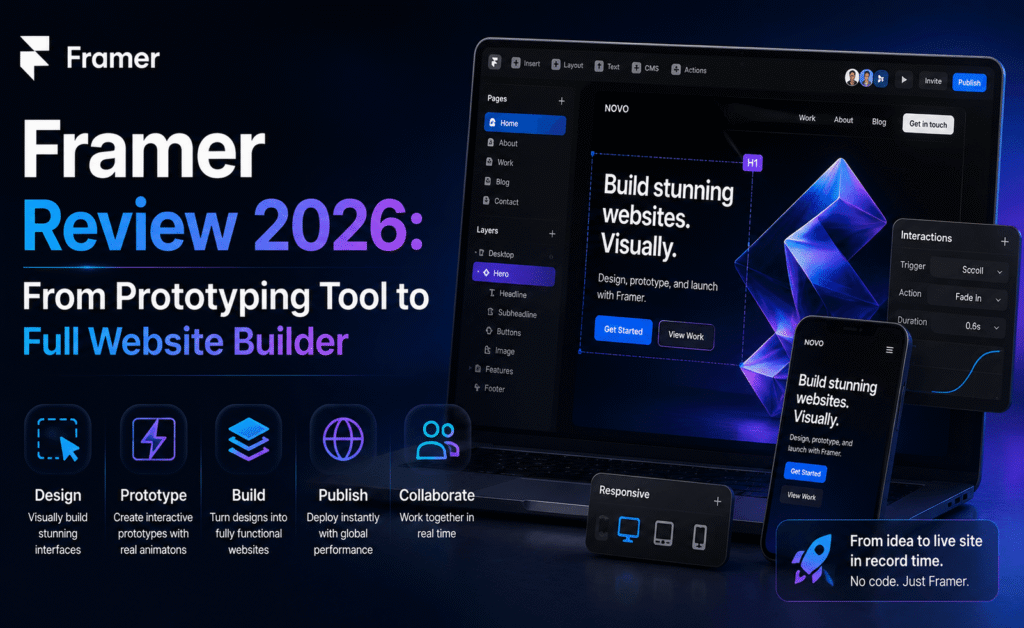
Framer Review 2026: From Prototyping Tool to Full Website Builder
Rating: 4.6/5 — Best for Design-to-Live-Website Workflows
Framer started life as a code-based prototyping tool for designers who wanted more realistic interactions than static mockups could offer. It has since transformed into something far more ambitious: a visual website builder that lets designers publish production-ready sites without writing a line of code. The Tedony Team spent ten days building and publishing a real marketing site in Framer to evaluate whether it can replace a traditional design-plus-developer workflow.
What Is Framer?
Framer today is best described as a no-code website builder with a designer’s sensibility. It combines a visual canvas similar to Figma with responsive breakpoints, CMS functionality, animations, and one-click publishing to a live domain. Rather than designing a mockup and handing it to a developer, teams can design and ship the actual website from the same file.
Key Features We Tested
1. Visual Canvas and Responsive Design
Framer’s canvas will feel immediately familiar to anyone who has used Figma, with frames, auto-layout style “stacks,” and component variants. Where it differs is that every element you place is also live, functioning HTML/CSS underneath — there’s no separate “build” step. We resized our test site from desktop to tablet to mobile breakpoints and adjusted layout overrides at each size without touching a code editor.
2. CMS and Dynamic Content
Framer’s built-in CMS let us set up a blog collection with custom fields (title, author, category, featured image) and bind them to a template page. Publishing new posts required no redesign work — new CMS entries automatically populated using the existing layout, similar to how a headless CMS pairs with a custom front end, but without any separate hosting or API setup.
3. Animations and Interactions
This is where Framer’s prototyping roots shine. Scroll-triggered animations, hover states, and page transitions are all built with visual controls rather than code, and the results feel notably smoother than typical no-code website builders. Our scroll-reveal animations on the test homepage performed at a consistently high frame rate on both desktop and mobile.
4. SEO and Performance
Framer sites ship with reasonably clean markup, editable meta tags, automatic image optimization, and built-in support for redirects and custom code injection (for analytics scripts, for example). Our test site scored well on standard page-speed checks out of the box, without additional performance tuning.
5. Publishing and Hosting
Sites publish directly to a Framer subdomain or a connected custom domain with a few clicks, and hosting is included in the plan price — there’s no separate server or deployment pipeline to manage, which is a meaningful advantage for smaller teams without dedicated DevOps support.
How We Tested Framer
The Tedony Team treated this review as a real client engagement rather than a demo. Over ten days, we designed, built, and published a five-page marketing site for a fictional software startup, including a homepage with scroll animations, a pricing page with an interactive toggle between monthly and annual billing, a blog powered by Framer’s CMS, and a contact form connected to an email notification. We tracked how much of the build required custom code versus visual tools alone, and timed the full process from blank canvas to a live, published domain.
We also handed the finished project to a teammate unfamiliar with the file to see how easily they could make a content update — swapping a hero image and editing pricing copy — without a walkthrough, to test how sustainable the site would be for a non-technical marketing team to maintain after launch.
Design-to-Code Fidelity
The most impressive result from our test was how little the published site differed from the design canvas. Because there’s no separate “build” phase, what we saw while designing was, pixel for pixel, what shipped to the live URL — something that’s genuinely hard to achieve in a traditional design-then-develop workflow, where translation gaps between a Figma mockup and the coded result are almost inevitable.
Custom code overrides are available for teams that need more granular control than the visual tools provide, and we used a small code component to integrate a third-party scheduling widget. This hybrid approach — visual-first with an escape hatch into code when needed — strikes a good balance for teams without a dedicated engineer on staff.
SEO and Content Team Handoff
For content-heavy sites, Framer’s CMS collections handled our blog test well: creating a new post required filling out a simple form (title, slug, body, featured image, category) rather than touching layout at all, which is exactly what a marketing team without design skills needs day to day. Meta title and description fields are editable per page, and the platform generates a sitemap automatically, both of which matter for SEO health without additional plugins.
Frequently Asked Questions
Can Framer handle e-commerce?
Framer supports basic commerce integrations through third-party embeds and code components, but it isn’t a dedicated e-commerce platform. Stores with complex inventory, checkout, or fulfillment needs are usually better served by a platform built specifically for commerce.
Do I need to know how to code to use Framer?
No — our entire test site was built without writing custom code, though having some familiarity with CSS concepts helps when fine-tuning animations or responsive behavior.
What happens if I want to leave Framer later?
Content can be exported, but because Framer manages hosting and rendering internally, migrating a live site to another platform typically requires rebuilding the front end rather than a simple file export, which is worth factoring into a long-term platform decision.
Pricing Breakdown
| Plan | Price | Best For |
|---|---|---|
| Free | $0 | Testing and personal projects (Framer subdomain) |
| Mini | ~$5/month | Simple one-page sites on a custom domain |
| Basic | ~$15/month | Small business sites with CMS needs |
| Pro | ~$35/month | Growing sites with higher traffic and advanced CMS |
Higher-traffic sites and larger CMS collections may require stepping up a tier, so it’s worth estimating expected monthly visitors before committing to an annual plan.
Pros and Cons
| Pros | Cons |
|---|---|
| Design and live website in a single tool | Less suited to complex web apps needing custom backend logic |
| Best-in-class animation and interaction controls | Can get pricey as traffic and CMS needs scale |
| Built-in CMS removes need for separate headless setup | Migrating away from Framer later can require a rebuild |
| Hosting, SSL, and publishing included | Team collaboration features still maturing vs. Figma |
| Clean output and solid out-of-the-box performance | Fewer third-party integrations than mature CMS platforms |
Who Should Use Framer?
Framer is an excellent fit for designers, startups, and marketing teams who want to go from concept to a live, animated website without involving a developer for every content update. It’s less appropriate for products requiring complex business logic, user authentication systems, or deep backend integrations, where a traditional development stack still makes more sense.
Design agencies pitching new clients also benefit from Framer’s speed: instead of presenting a static Figma mockup and a separate development timeline, agencies can walk a prospective client through a fully interactive, publishable site within the pitch meeting itself, which noticeably shortens the gap between concept approval and going live.
Tips for Getting the Most Out of Framer
- Start with a CMS structure before designing individual pages. Planning your collection fields (blog posts, team members, case studies) up front avoids having to restructure templates after content is already populated.
- Use breakpoints deliberately, not as an afterthought. Designing mobile layouts alongside desktop from the start, rather than retrofitting responsiveness at the end, produced noticeably cleaner results in our test build.
- Keep animations purposeful. It’s easy to over-animate simply because the tools make it effortless; our best-performing test pages used two or three intentional scroll effects rather than animating every element on the page.
- Set up redirects before changing URLs. If you rename a page or CMS slug after publishing, configuring a redirect prevents broken links from previously shared or indexed URLs.
- Test the handoff with a non-technical teammate early. Confirming that someone outside the design team can confidently make a content update reduces support requests after the site goes live.
Accessibility and Site Health
Framer’s published output includes semantic HTML by default, and our test site passed a basic accessibility scan with only minor warnings around a couple of decorative images missing alt text, which took seconds to fix directly in the CMS fields. Built-in analytics integration and automatic sitemap generation rounded out a launch checklist that would normally require several separate plugins or manual setup steps on a traditional CMS.
Final Verdict
Framer has successfully repositioned itself from a niche prototyping tool into a serious contender for real website production. The ability to design, animate, and publish from one canvas — with a genuinely good-looking result — is a rare combination in the no-code space. Teams building marketing sites, portfolios, or content-driven pages will find it a genuine productivity boost; teams building complex applications should still look elsewhere.
What ultimately sets Framer apart in our testing is the absence of a hard boundary between “designing” and “shipping.” That single change in workflow — removing the handoff step entirely for a large class of everyday websites — is a meaningfully different way of working, and one that other tools in this category are still trying to catch up to.
Tedony Score: 4.6/5