

Claude Code Desktop Adds Live iOS Simulator Support, Letting Developers Watch Their Apps Build in Real Time
Anthropic’s Claude Code Desktop now integrates directly with Apple’s iOS Simulator in public beta, opening a live pane where developers can watch Claude build, run, and debug iPhone apps without macOS Accessibility permissions.
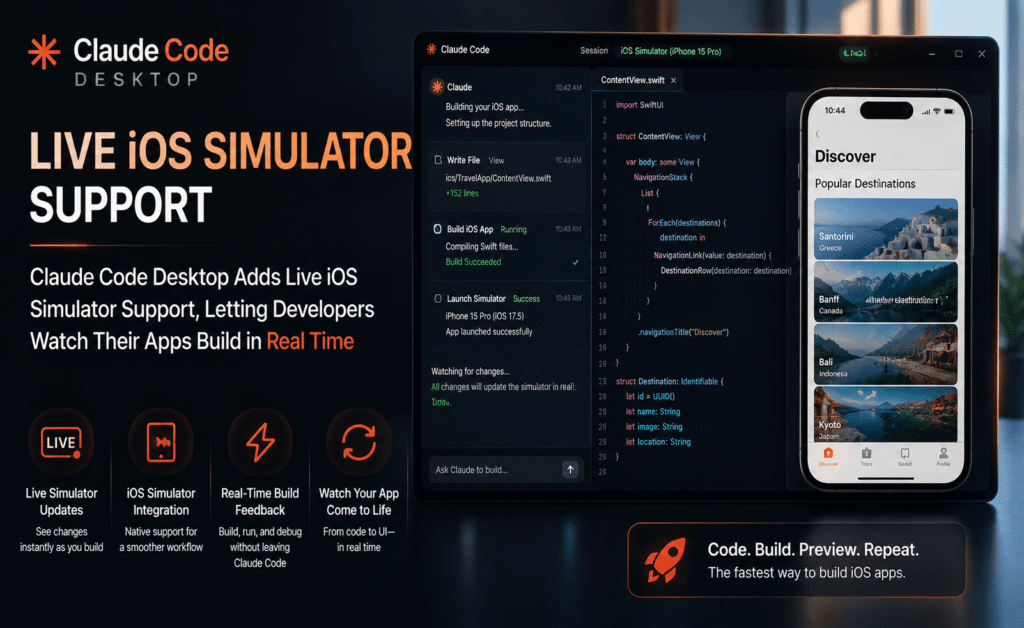
Claude Code Desktop Adds Live iOS Simulator Support, Letting Developers Watch Their Apps Build in Real Time
Anthropic has rolled out iOS Simulator support for Claude Code Desktop, giving Mac developers a way to build, run, test, and debug iPhone applications without ever leaving the Claude Code conversation window. The integration, now available in public beta, opens a live simulator pane directly beside the chat, letting the AI coding assistant watch its own work run in real time rather than reasoning about code in the abstract.
What Actually Changed
Previously, testing an iOS app built with the help of an AI coding assistant meant a fairly manual loop: generate code, switch over to Xcode, build, launch the simulator separately, poke around, note what broke, switch back, and describe the problem in words. Claude Code Desktop’s new integration collapses that loop. When a developer asks Claude to build, run, or check an app, a simulator pane opens directly next to the conversation. Claude can watch the simulator live as the app runs, interact with it, and iterate, while the developer is free to keep using the simulator themselves at the same time, tapping through screens or triggering flows manually alongside the AI.
No Accessibility Permissions Required
One of the more technically interesting aspects of this release is how it differs from Claude’s existing computer use capability. Computer use controls a screen the way a person would, which on macOS requires granting Accessibility and Screen Recording permissions, a setup step that some organizations restrict or that individual users are understandably cautious about granting broadly. The new simulator pane instead communicates directly with Apple’s iOS Simulator, sidestepping that permission model entirely. The result is a smoother setup: no wrestling with macOS privacy settings, just Xcode with the iOS platform installed and the desktop app.
What Developers Can Actually Do With It
In practice, the integration supports a fairly broad range of everyday iOS development tasks. Developers can ask Claude to:
- Build a new iOS application from scratch and launch it directly in the simulator pane.
- Debug a crash by reproducing it live and inspecting what the app is doing when it fails.
- Refine a specific screen’s user interface, then immediately see the visual result rather than waiting for a manual rebuild.
- Test a full user flow, tapping through multiple screens in sequence, with Claude observing outcomes at each step.
Because Claude can read what appears on screen, interact with buttons and menus inside the simulator, and adjust its code based on what it observes, the workflow starts to resemble a developer working with a very fast, very literal-minded pair-programming partner who never gets tired of rebuilding the project one more time to check a fix.
The Fine Print: Sessions, Limits, and Data Handling
A few practical details matter here, especially for teams evaluating whether to adopt the feature. The simulator pane only works in local sessions, since Anthropic’s cloud and SSH-based Claude Code sessions have no way to reach a simulator that is physically running on a developer’s own Mac. Each session gets its own dedicated simulator, and up to four simulator panes can be open simultaneously, which is useful for anyone testing across multiple simulated device types at once. The first time Claude interacts with a given simulated device, the desktop app prompts for a one-time permission to control it and capture screenshots, so nothing happens silently in the background without at least one explicit confirmation.
On the data side, Anthropic has been explicit that screenshots captured from the simulator are sent to the company and retained under its standard conversation retention policies, the same rules that already govern regular Claude Code sessions. The practical guidance that follows from that is straightforward but worth repeating for any team rolling this out: avoid signing into real personal or company accounts on any simulated device that Claude is actively controlling, and treat simulator sessions the way you would treat any other AI-assisted development environment when it comes to sensitive credentials or data.
Requirements and Access
The iOS Simulator integration requires the Claude Code desktop app running on macOS, along with Xcode and the iOS platform files installed locally, meaning the feature is squarely aimed at developers who already have a working Apple development toolchain on their machine rather than something that works out of the box on a fresh install. It is available now in public beta to Pro, Max, and Team plan users, with full setup instructions published on Anthropic’s support site for anyone getting started.
Where This Fits in the Bigger Picture
The release lands alongside a broader push from Anthropic to make Claude Code feel less like a code generator bolted onto a chat window and more like a complete, agentic development environment. Pairing code generation with a live, interactive view of the running result is a natural next step for that ambition, and it directly targets one of the most repetitive parts of mobile development: the endless build-check-fix loop that eats up disproportionate amounts of a developer’s day, especially early in a project when interfaces are still being roughed out.
Editor’s take: simulator testing is not a substitute for testing on real hardware, where cameras, sensors, network variability, and genuine hardware quirks can surface problems no simulator will ever reproduce. But for the extremely common case of iterating on UI layout, basic navigation flows, and everyday bugs, removing the manual switch-and-rebuild cycle is a genuinely useful bit of friction to eliminate, and public beta is exactly the right stage to find out how well it holds up against messier, real-world projects.
How This Compares to Existing AI-Assisted Testing Approaches
AI coding assistants have offered some flavor of “run and check the result” for a while now, but most implementations have relied on either screen-reading through general computer use, with all the permission overhead that involves, or on developers manually copying error messages and screenshots back into a chat window after running a build themselves. A direct, permission-light simulator integration sits in between those two approaches: it is more automated and immediate than manual copy-and-paste debugging, but more scoped and predictable than giving an AI assistant broad control over an entire desktop. That scoping is arguably the more interesting design decision here. By limiting the integration specifically to the iOS Simulator rather than general screen control, Anthropic has traded some flexibility for a meaningfully simpler trust model, since a simulator is by definition a disposable, sandboxed environment rather than a developer’s actual production machine.
Early Developer Reactions
Reaction from the developer community since the beta’s launch has generally leaned positive, with much of the commentary focused on how much manual context-switching the integration removes from a typical debugging session. Some early testers have also flagged practical questions around cost, noting that a workflow involving repeated rebuild-and-check cycles could consume more usage than a purely text-based coding session, depending on how a given plan meters usage. Others have pointed out, reasonably, that a smoother building experience does not by itself guarantee better code, and that developers still need to review what Claude produces rather than treating a successful simulator run as proof the implementation is correct or well-architected. Both are fair points, and they underline that this integration is best understood as removing friction from an existing workflow rather than replacing the judgment a developer brings to reviewing the result.
What This Means for Teams Evaluating AI Coding Tools
For engineering teams currently comparing AI-assisted development tools, the practical question this release raises is less “does this tool write good Swift code” and more “how much of my actual day-to-day loop does this tool remove me from.” A live, watchable simulator pane is a meaningful answer to that second question specifically for iOS development, a platform where the build-and-check cycle has historically been slower and more manual than equivalent web development workflows. Teams building primarily for iOS, particularly smaller teams without a dedicated QA function to catch obvious UI regressions early, are likely to see the clearest immediate benefit. Teams working across many platforms simultaneously will want to weigh this iOS-specific capability against how well the same tool serves their other target platforms, since this particular integration does not extend to Android or other environments.
Looking Ahead
Public beta status means this feature is very much still evolving, and Anthropic has a track record of iterating quickly on developer tooling once real usage data starts coming in. Reasonable things to watch for in coming updates include expanded simulator device support, tighter integration with existing Xcode projects and test suites, and clearer usage-cost visibility for teams running frequent build-and-check loops. Whether or not an equivalent capability eventually extends to Android emulators remains an open question, but the underlying pattern, giving an AI coding assistant a live, low-permission window into how its own output actually behaves, is a template that clearly has room to grow beyond iOS alone.
Availability
The feature is live today for eligible Claude Code Desktop users on macOS. Teams interested in trying it should confirm they are running a sufficiently recent build of the desktop app, have Xcode with the iOS platform installed, and are on a Pro, Max, or Team plan before getting started, and should read through Anthropic’s published guidance on data handling before pointing the tool at any project involving real user accounts or sensitive test data.